
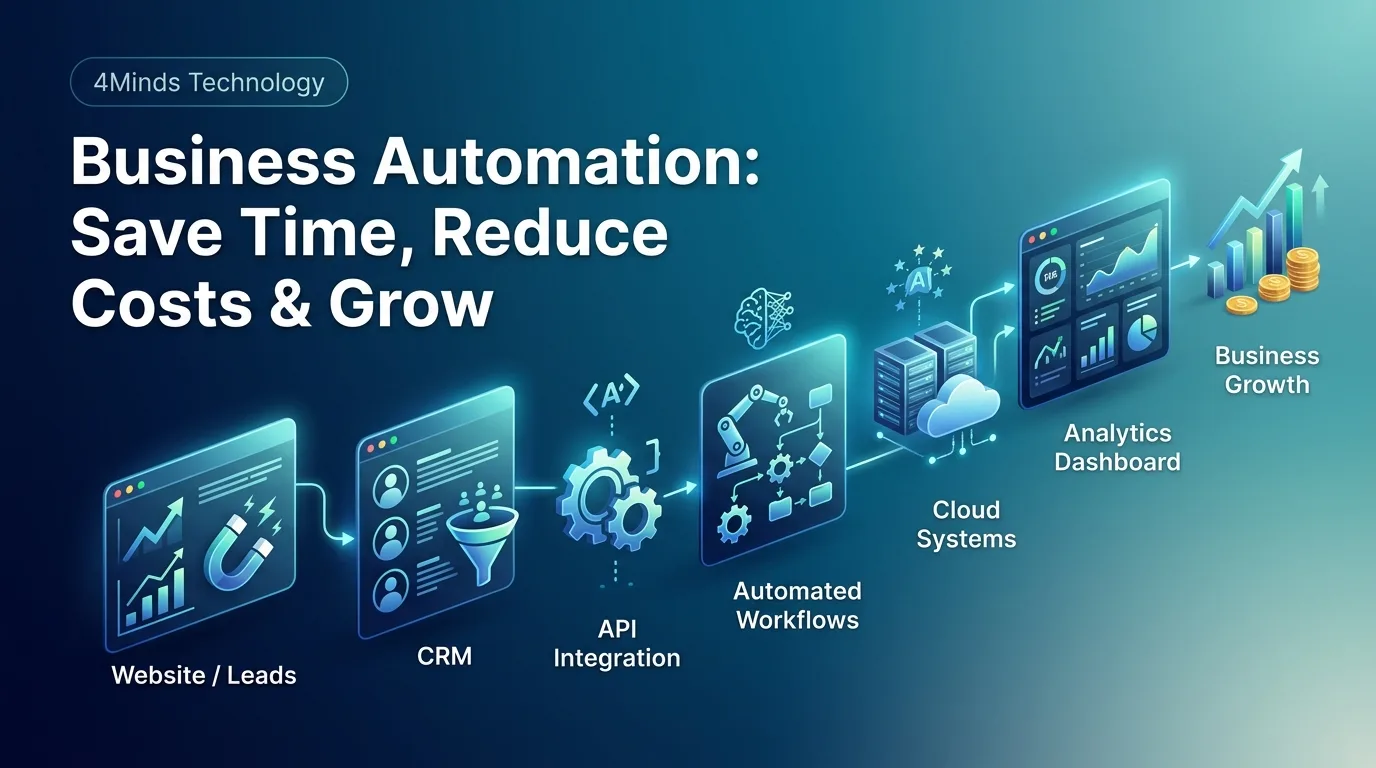
Every business owner eventually encounters the same operational wall: the day has only twenty-four hours, yet administrative overhead keeps multiplying. Teams find themselves trapped in a cycle of manual data entry, manual follow-ups, copying information across multiple spreadsheets, and chasing status updates. When key employees spend hours on administrative tasks rather than high-value strategic work, growth stalls.
Operational bottlenecks do not merely slow down daily output; they can also increase costs, create avoidable errors, and make it harder for a business to scale. This is where business automation becomes valuable.
What Is Business Automation?
Business automation is the use of software, integrations, and predefined workflows to handle repetitive business processes with less manual effort. Instead of asking employees to repeat the same steps every day, automation allows systems to perform those tasks consistently and efficiently.
Automation can be as simple as automatically sending a confirmation email after a form submission, or as advanced as connecting a CRM, payment system, inventory platform, customer support software, and analytics dashboard through APIs.
Why Businesses Need Automation
As a company grows, its processes usually become more complicated. More customers mean more records, more orders create more data, and larger teams require better communication and coordination.
Without automation, businesses often rely on spreadsheets, emails, messaging applications, and manually updated systems. These processes may work initially, but they become difficult to manage at scale.
Business automation helps organizations create structured workflows that reduce unnecessary manual work while giving teams better visibility into their operations.
1. Save Valuable Time
Time is one of the most valuable resources in any business. Employees should spend their working hours solving problems, serving customers, improving products, and making important decisions rather than repeatedly entering the same information.
For example, when a new lead submits a website form, an automated workflow can immediately create a CRM record, notify the sales team, send a confirmation email, and schedule a follow-up task.
What previously required several manual steps can become one connected workflow.
2. Reduce Operational Costs
Manual processes require employee time. When teams spend hours every week performing repetitive administrative tasks, those hours become an operational cost.
Automation can reduce the amount of time required for repetitive processes and allow employees to focus on activities that create greater business value.
The goal is not simply to replace people with software. The goal is to make better use of the people already working in the business.
3. Reduce Human Error
Repetitive manual work can lead to mistakes. Information can be entered incorrectly, records can be forgotten, and data can become inconsistent between different systems.
Automated workflows can reduce these problems by applying predefined rules every time a process runs.
For example, an order management system can automatically update inventory, record the transaction, notify the appropriate team, and send an order confirmation to the customer.
Proper testing and monitoring are still important, but automation can significantly reduce unnecessary manual errors.
4. Connect Different Business Systems
Modern businesses rarely depend on a single application. A company may use a website, CRM, accounting software, payment gateway, inventory system, communication platform, and analytics tools at the same time.
The real value of automation appears when these systems can communicate with each other.
API integration allows businesses to connect different platforms and move information between them automatically.
- Website leads can be sent directly to a CRM.
- Orders can automatically update inventory.
- Payments can be synchronized with accounting systems.
- Customer activity can be connected with marketing workflows.
- Support requests can automatically create internal tasks.
- Business data can be collected into analytics dashboards.
Instead of managing disconnected systems manually, businesses can create a connected digital environment.
5. Improve Customer Experience
Customers expect fast and reliable communication. Delayed responses, missed follow-ups, and inconsistent information can negatively affect the customer experience.
Automation can handle many routine customer interactions, including confirmation emails, appointment reminders, order updates, notifications, and support acknowledgements.
This allows employees to focus on conversations and problems that actually require human attention.
6. Automate CRM and Sales Processes
Sales teams often spend a significant amount of time managing leads and follow-ups.
A properly designed CRM automation workflow can assign new leads to the right salesperson, create follow-up reminders, update lead statuses, send notifications, and track customer interactions.
This makes it easier for sales teams to focus on converting opportunities instead of maintaining spreadsheets and manually tracking every activity.
7. Make Better Use of Business Data
Automation is not only about completing tasks faster. It can also help businesses collect and organize useful information.
When data from sales, customers, marketing, operations, and other systems is connected, businesses can build dashboards that provide a clearer view of performance.
Decision-makers can use this information to identify trends, understand bottlenecks, monitor important metrics, and make better business decisions.
Where Should a Business Start?
Businesses do not need to automate everything at once. A better approach is to identify one process that is repetitive, time-consuming, or prone to errors.
Identify Repetitive Tasks
Start by listing tasks that employees perform repeatedly. Data entry, customer follow-ups, reporting, notifications, approvals, and transferring information between systems are common opportunities.
Measure the Current Process
Before automating a workflow, understand how it currently works. Measure the time involved, identify common errors, and find the steps that create the most delays.
Design the Workflow
Define what starts the process, what actions should happen automatically, where conditions or approvals are required, and what the final outcome should be.
Choose the Right Technology
Depending on the requirements, the solution may involve a CRM, custom software, APIs, cloud services, databases, workflow automation tools, or AI-powered systems.
Test Before Scaling
Automation should be tested carefully before it becomes part of a critical business process. Testing should include normal scenarios, unexpected inputs, permissions, failures, and recovery procedures.
When Custom Software Makes Sense
Existing business software can solve many common problems, but not every organization works in the same way.
Custom software can be useful when a business has unique workflows, multiple systems that need to communicate, specialized user roles, or processes that cannot be handled effectively by standard software.
A custom digital solution can combine business rules, dashboards, APIs, databases, user permissions, notifications, reporting, and integrations into one platform designed around the company's actual requirements.
Common Automation Mistakes
Automation should simplify a business process rather than make it more complicated. Some common mistakes include:
- Automating a process without understanding the existing workflow.
- Using too many disconnected tools.
- Ignoring security and user permissions.
- Failing to test unusual or unexpected scenarios.
- Automating processes that still require human approval.
- Not monitoring automated workflows after deployment.
- Choosing technology without considering future scalability.
The Future of Business Automation
Business automation is becoming more connected as companies adopt cloud applications, APIs, analytics, AI, and custom software.
The future is not simply about automating individual tasks. It is about creating connected digital workflows where different systems can exchange information and work together.
Businesses that approach automation strategically can reduce operational friction while creating a stronger foundation for future growth.
Final Thoughts
Business automation can help companies save time, reduce repetitive work, minimize avoidable errors, improve customer communication, and connect the systems they already use.
The best place to start is with a real business problem. Identify where your team is spending unnecessary time, understand the process, and then use technology to make that workflow simpler and more efficient.
Whether you need CRM automation, API integration, a custom business application, workflow automation, analytics, or a complete digital platform, the right solution should be built around your actual business requirements.
At 4Minds Technology, we help businesses build custom digital solutions, automate workflows, connect business systems, and create technology that supports sustainable growth.


